Simulation / Emulation
This blog is part of the series ‘SAP EWM meets Automation – Discover EWM MFS’. As with all posts of this series, the content provided here has been created in cooperation with the SAP EWM team at Swisslog. Feel free to visit their website in case you want to learn more about the services offered by Swisslog or to browse open positions within their EWM team!
With this blog post I look into the EWM standard simulation/emulation which you can use within your MFS projects in case you do not have the possibility to test/work with the real hardware/subsystems (yet).
Before we look into the agenda, let us tackle the question “What is the difference between a simulation and an emulation and what do we have in standard EWM MFS?”.
Simulation vs. Emulation
I give you my interpretation right at the beginning –
I do think what we have in EWM standard can be described with the term ‘Emulation’. This is at least my understanding based on the definitions that I found while researching this topic/question. Here is a collection of descriptions & definitions that helped me coming to my conclusion.
It's a difference in focus. Emulators focus on recreating the behavior of a system, with no regard for how the system functions internally. Simulators focus on modeling the components of a system. You use an emulator when you care mostly about what a system does, and a simulator when you care about how it does it.
Emulation comes from æmulus, "striving, rivaling," and is related to "imitate" and "image," which suggests a surface-lever resemblance. "Simulation" comes from similis "like", as does the word "similar," which perhaps suggests a deeper congruence.
By that I mean that you use an emulator when you can't use the real thing, and you use a simulator when you can't use the real thing and you want to find something out about it.
An emulator is an alternative to the real system but a simulator is used to optimize, understand and estimate the real system.
Source: https://stackoverflow.com/questions/1584617/simulator-or-emulator-what-is-the-difference
The flow of loads within the simulation are controlled by algorithms developed to closely mirror how the system would be controlled by a real WCS or WMS.
An emulation model is generated and is used to test and commission the WCS controls software. Interfaces within the emulation model allow the WCS to connect as it would connect to the real Automated Material Handling System.
Source: https://www.logistex.com/post/why-simulating-emulating-warehouse-automation-makes-sense
Conclusion –
As mentioned above, I do think that we have an emulation in EWM standard although the name & description of the function module that EWM offers (details later) indicates that it provides a simulation. Anyways – for me it is an emulation and hence, for the rest of this article I will stick to this term.
Having answered this initial question, let us look the agenda for the remaining part of the blog-post:
- Simulation vs. Emulation
- What are the differences and what do we have as part of standard EWM? > Already covered at this point. See above for the answer!
- Purpose / Use-Cases
- What can the emulation do and what can it not do for us?
- SAP Standard MFS emulation
- How do we use the emulation in the context of EWM MFS?
- Configuration
- Hands-on! What do we need to configure in order to use the emulation?
- Code-Review
- How is the standard emulation implemented technically?
Purpose / Use-cases
The emulation in EWM is needed during the development & testing phase, when
- the real hardware is not installed yet (so there is no real connection with the PLC), or
- the real hardware is installed but it is simply too much effort to use it for testing (~ as tests with the hardware are time-consuming (~costly) you usually start testing with real hardware only once you are sure that a given configuration/development is working fine with the emulation).
So what are the things that you can test with the standard emulation and what can it not be used for?
I start with a list of things where it can really be useful:
Routing: LOSC / Case Conveyor Routing
- As the emulation will automatically process telegrams (and potentially confirm intermediate tasks) for you, you can easily test complex routings based on the LOSC or the Case Conveyor Routing without having to jump in manually. That means you can validate your customizing of multiple routes even for complex networks without spending much time
Validation of format & content of outgoing telegrams
- As a result of using the emulation you will get telegrams looking like they will look like when you are later communicating with the real subsystems. Thus, you can validate whether your code creates telegrams in a format and with a content which is in line with what you agreed upon with your subsystem/team vendor as part of the interface specification
Processing of incoming telegrams with different content
- You can mass create the incoming telegrams with different data for multiple different scenarios. This way you can for instance easily emulate all kind of errors that might be sent from the subsystem to EWM and validate the EWM coding which is supposed to process those errors
Having discussed the areas where the emulation is useful, let us now focus on the areas where it is not useful or at least does not really help you to validate your setups.
Communication layer
- As long as you are using the pure ABAP-based EWM emulation (details later in this blog post), you are not communicating with an external system at all. So no matter whether you are planning to use a RFC-based or TCP/IP based or whatever-based communication layer, you are not testing it at all. Thus, this physical connection and its protocols & handshake mechanisms need to be tested separately with additional tools or even better the real subsystem as soon as it is available
Processing on subsystem side
- Be aware that although the PLC looks & feels like a piece of hardware it has thousands of configurations and lines of code, even when controlling low-complex material flows. Whatever is sent to or received from EWM is processed by the logic sitting in the memory of the CPU. This whole configuration/coding on the subsystem is obviously ignored as long as we stay within EWM. Thus, you should not overrate what an emulation can do for you within your MFS projects! There is still a lot to be tested with the real subsystems!!
Emulation in the context of material flow systems
Let us now become a bit more functional/technical and first analyze the approach of emulating a subsystem in the context of a material flow system (no matter whether it is EWM controlling the MFS or any other WMS or MFC). You already know the graphic below in case you followed my blog so far. This is looking at the real world. The PLC is processing signals and communicates with EWM based on telegrams (green arrows). In the other direction, EWM is sending telegrams towards the PLC in order to make it activate/deactivate signals & sensors (orange arrows):
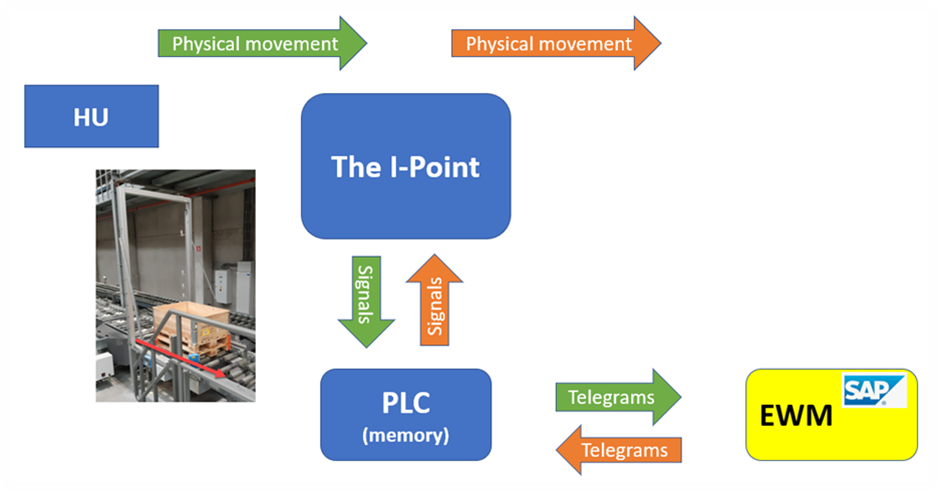
SAP standard now gives us an option that we can use in order to send & receive telegrams without a PLC and even without a non-SAP software to emulate the PLC. We do only need our standard EWM system – nothing else.
Function module /SCWM/MFS_SIM_RECEIVE is used for this purpose. Before we look into the details of this FM, let us do some more preparation work in order to understand the role of this FM.
Steps to communicate with a real subsystem
- EWM creates a telegram via FM
/SCWM/MFS_SENDand sends it to the PLC via ABAP-Push-Channels or via an RFC-Converter (e.g. a task to move a HU from A to B) - PLC processes the telegram and does whatever it is supposed to do (e.g. move the HU physically)
- Sends a response to EWM (e.g. confirmation that it moved the HU from A to B)
EWM processes the telegram via FM /SCWM/MFS_RECEIVE2 (e.g. confirms the open EWM task which belongs to the given HU)
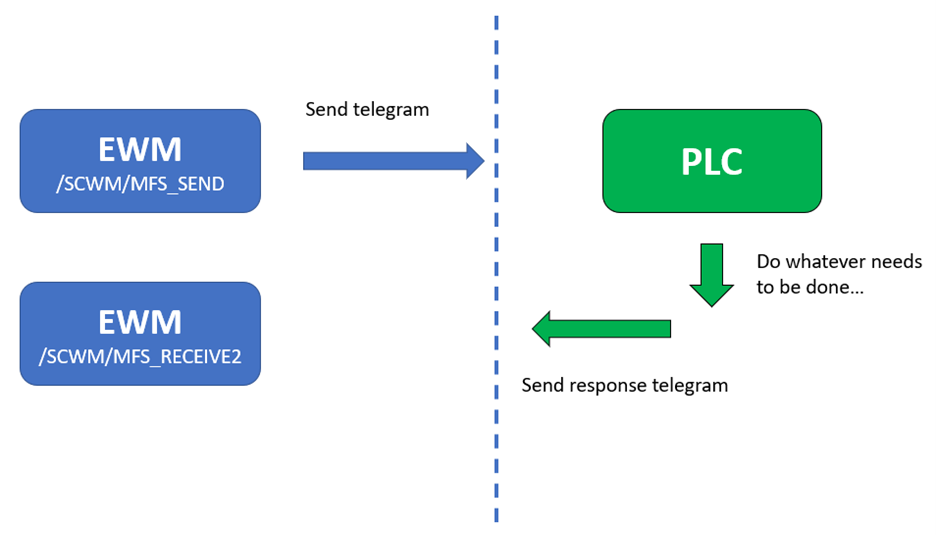
Steps with the EWM emulation
- EWM creates a telegram via FM
/SCWM/MFS_SENDand sends it to the emulation function module/SCWM/MFS_SIM_RECEIVE(e.g. a task to move a HU from A to B) - The emulation FM processes the telegram and sends a pre-defined response telegram (e.g. whenever EWM asks to move a HU from A to B, the emulation FM will respond with a telegram which confirms this task > we will look into details here later)
EWM processes the telegram with FM /SCWM/MFS_RECEIVE2 in the same way as if it would be talking to a real subsystem (e.g. confirm the open EWM task which belongs to the given HU)
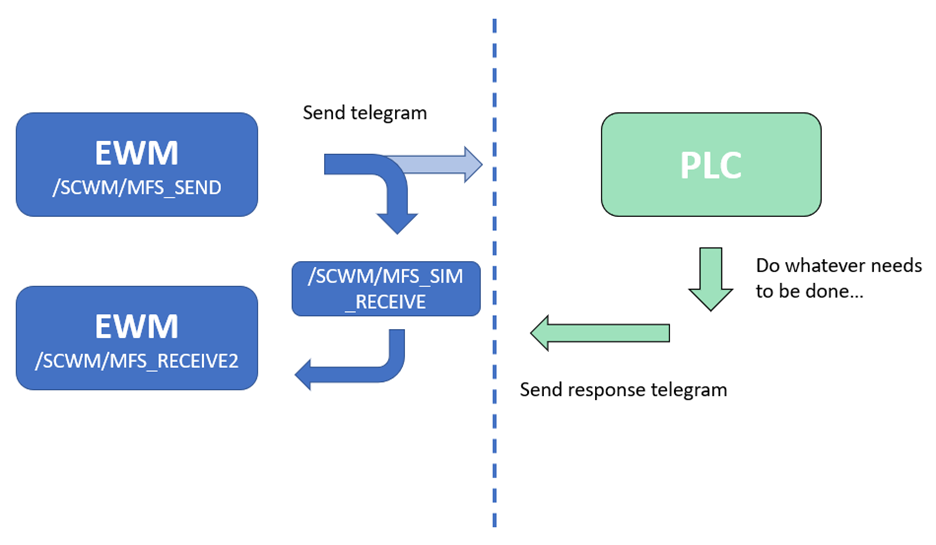
The concept as such should be clear now. But what needs to be done in order to involve the emulation function module and how does the FM actually knows what it needs to return?
Let us first look at the required configuration as this is rather simple.
Configuration
The only thing you need to do is to maintain the emulation function module as the sending FM in the PLC application data via transaction /SCWM/MFS_PLC:
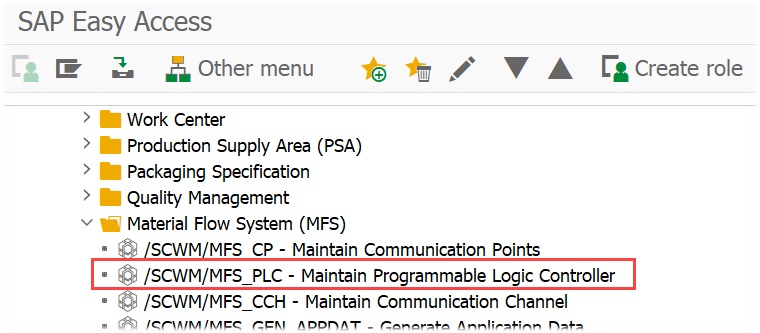
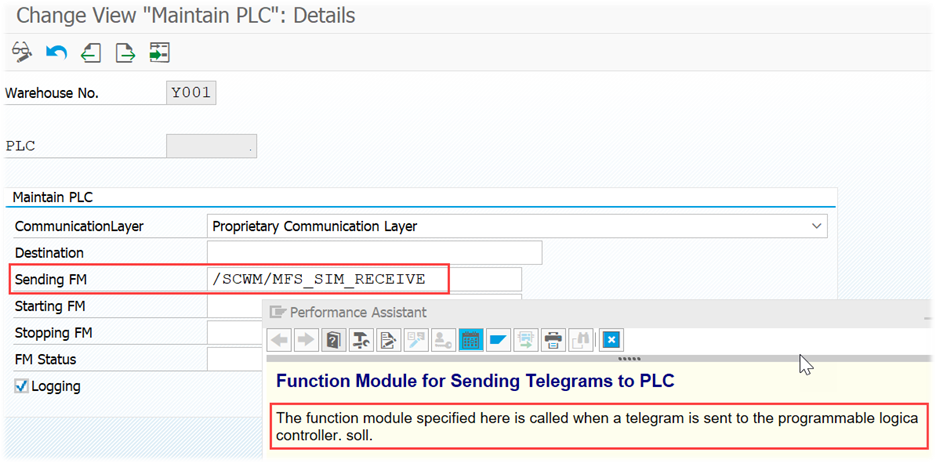
That’s it! With this setup EWM will send its telegrams to the emulation FM instead of an external subsystem. So how is this FM now able to send us the response that we need in order to achieve the objectives that we defined at the beginning of this blog post? (test the routing, validate the format/content of outgoing telegrams, validate the telegram processing FMs etc.).
Let us look into detail – time for a code-review!
Code-Review
Function module /SCWM/MFS_SIM_RECEIVE
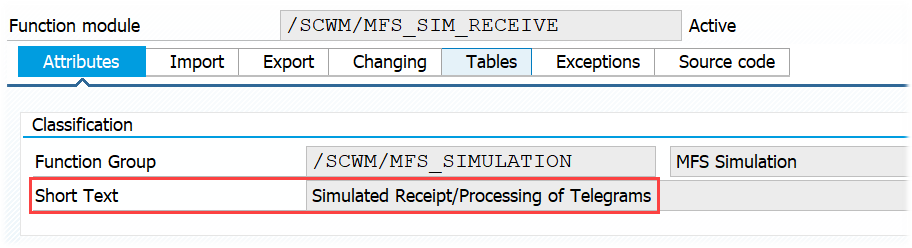
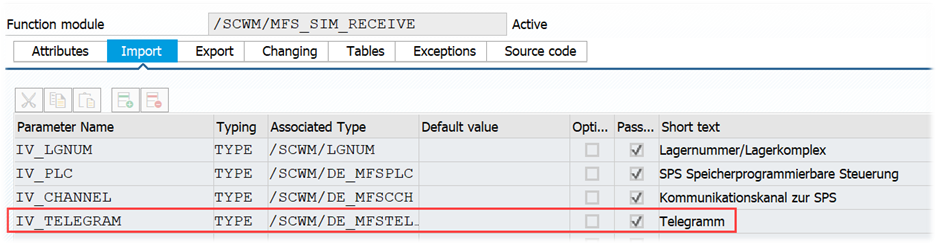
First of all it is important to understand the importing variables of the FM. Remember, the FM is replacing the subsystem as a communication partner. So where MFS usually hands over a telegram to the subsystem (e.g. via calling a middleware/RFC-converter or the PLC directly via ABAP-Push-Channel), we do now handover this telegram to the simulation FM:
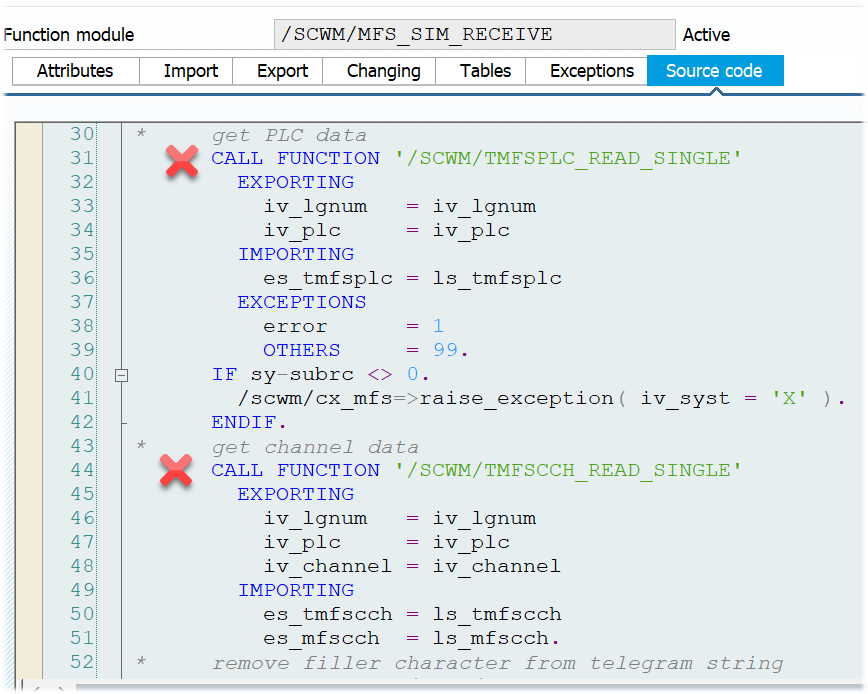
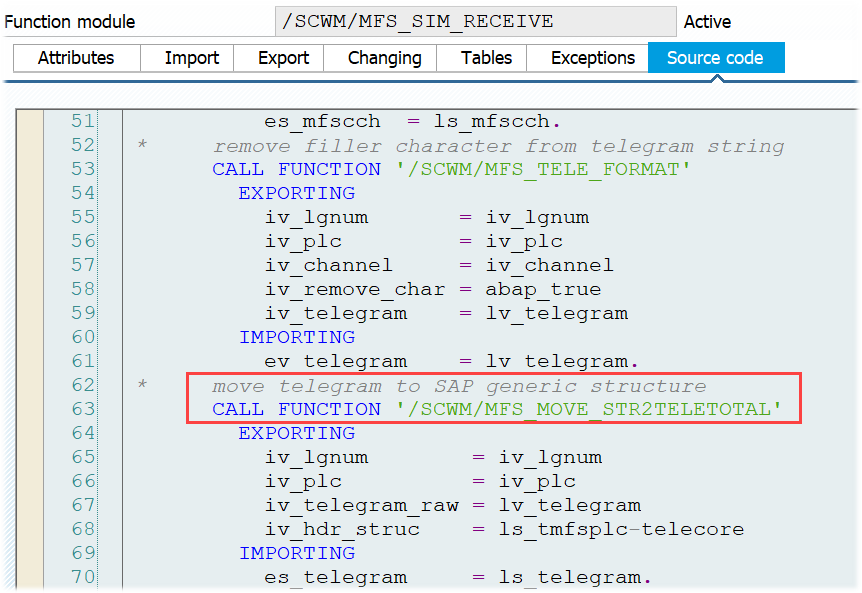
As a preparation for processing this telegram, the FM reads additional PLC and channel data based on the imported variables and moves the imported telegram data into the generic telegram structure /SCWM/S_MFS_TELETOTAL (this structure has all fields of all telegrams and simplifies processing in EWM MFS from technical perspective):
As part of the next step, EWM checks whether the telegram requires an acknowledgement to be sent to the sender (which is EWM here). Whether or not this is to be done depends on the protocol/handshake settings of the communication channel:
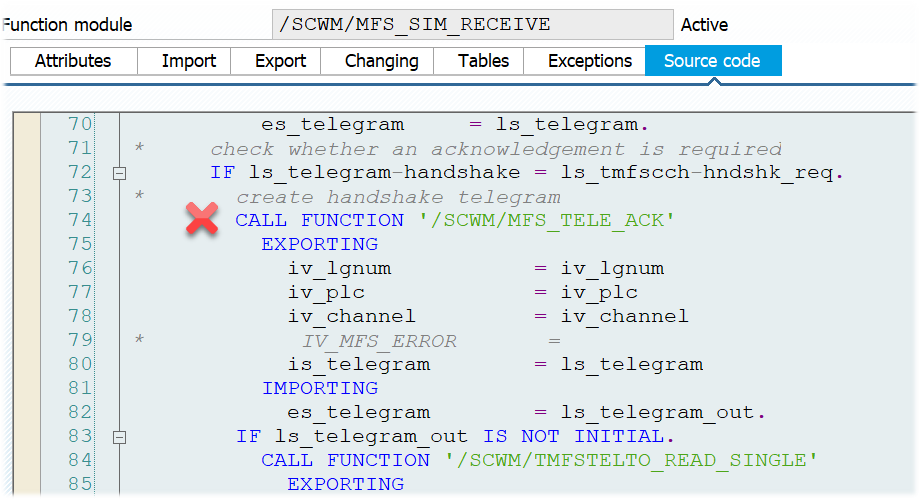
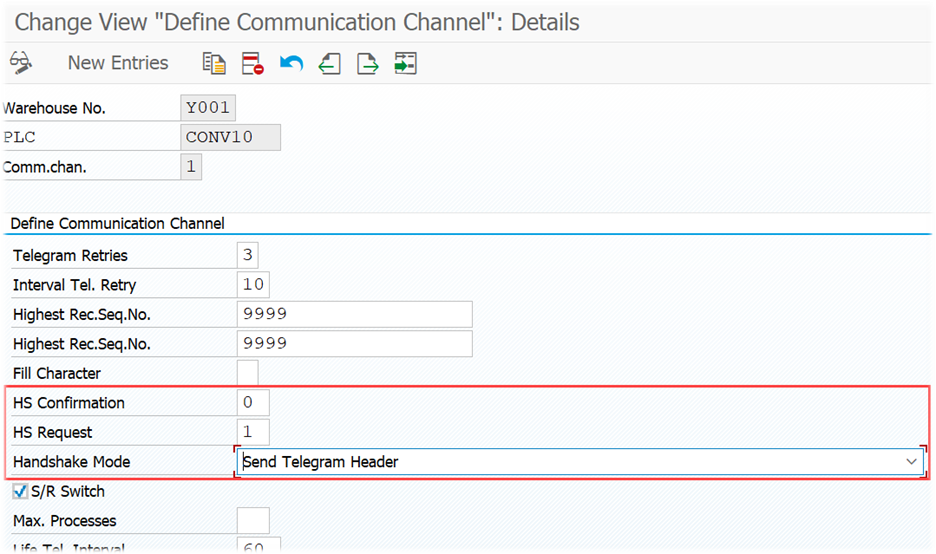
If the acknowledgement is created successfully, the emulation FM calls the standard FM to receive telegrams in EWM (/SCWM/MFS_RECEIVE2) in order to process it (so you can see already that you can use the emulation FM also in order to test the handshake settings of your communication channel).
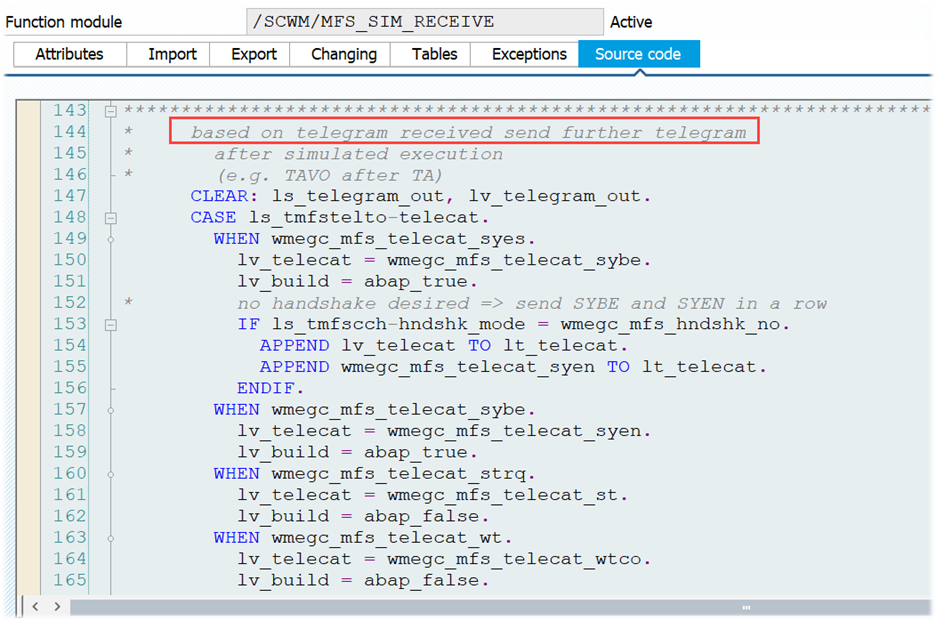
Now the core of this emulation FM begins. Based on the telegram received, it now creates a response telegram and hands it back to the telegram receiving logic of EWM MFS.
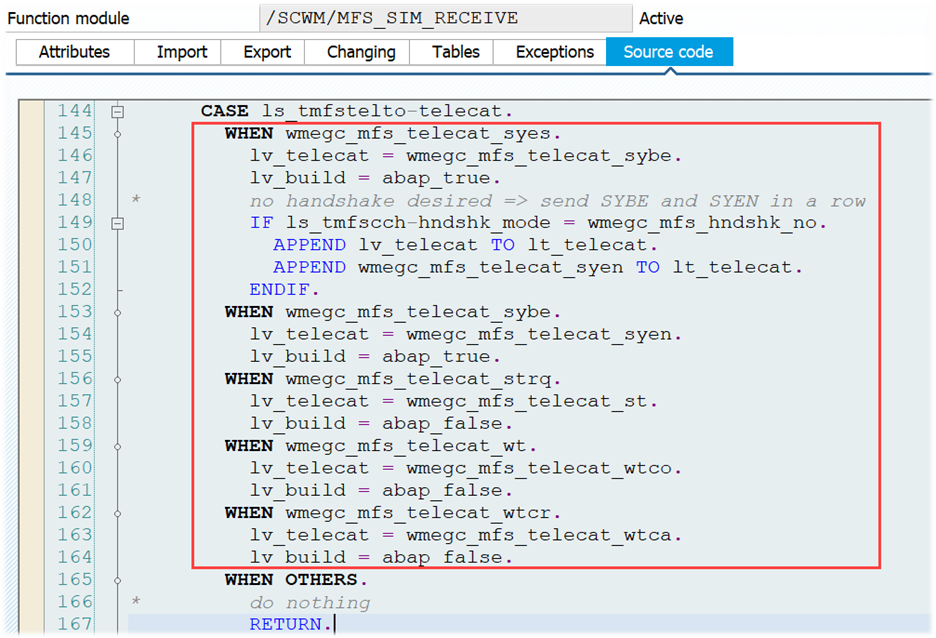
When you look at the case-statement here, you will easily understand the whole logic of the standard emulation (which I also tried to explain at the beginning of this section).
The statement just goes through all of the possible outgoing telegram categories and based on the category of the outgoing telegram it determines the category of the one which it now creates as a response:

Example for the most obvious one:
- Outgoing telegram type is a warehouse task
Incoming telegram to be created should be a warehouse task confirmation
Pretty simple. EWM standard covers
- Synchronization trigger > Synchronization start & Synchronization end
- Synchronization start > Synchronization end
- Status request > Status message
- Warehouse task > Task confirmation
Warehouse task cancellation > Cancellation confirmation
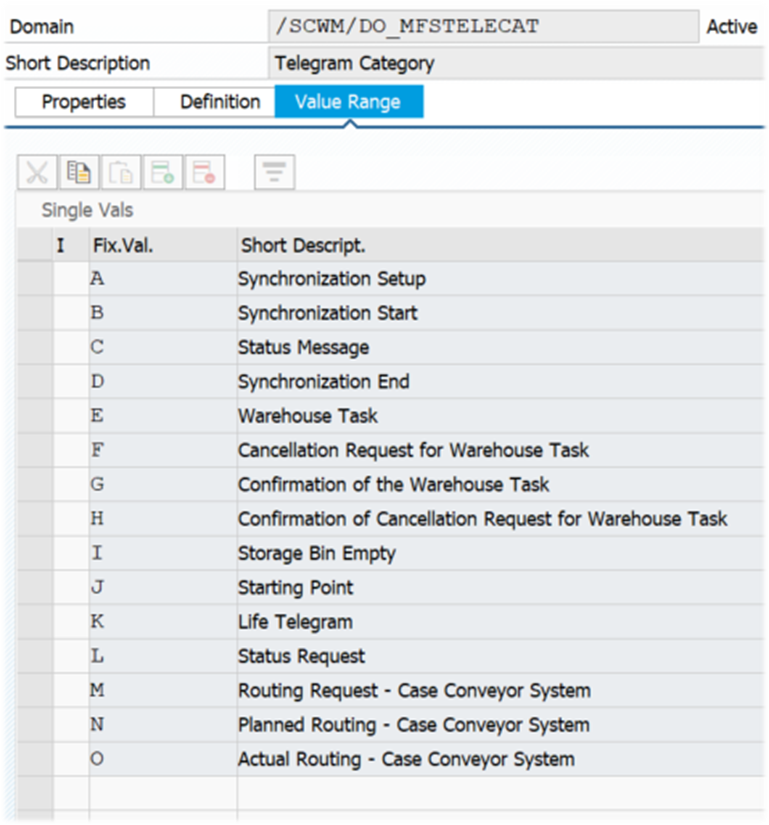
Having determined the category for the response, the next step is to build the response telegram. This is done by either FM /SCWM/MFS_BUILD_TELEGRAM (for channel synchronization) or FM /SCWM/TMFSTELTO_READ_SINGLE (for all other scenarios mentioned above):
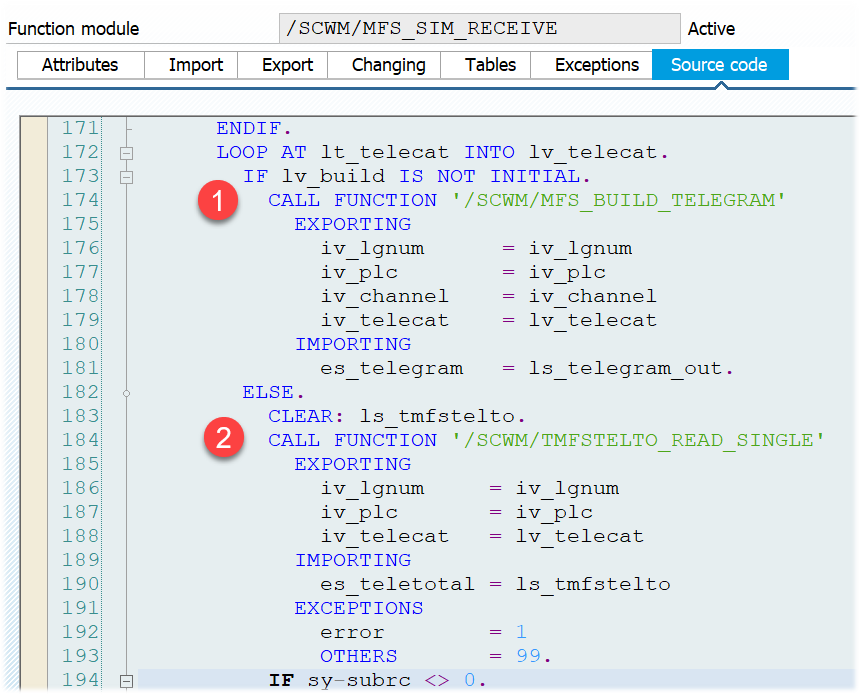
If you’ve expected complex logic here I have to disappoint you. Both are mainly used in order to determine the telegram type for the response telegram based on the category determined above. The other content of the telegram structure is not really changed and simply copied from the outgoing telegram.
As we have telegram content and type now, the only steps left are:
- Select channel data from table
/SCWM/MFSCHand update/determine the sequence number for the incoming telegram to be created - Set sender & receiver for the incoming telegram to be created (basically switch based on the outgoing telegram that initiated the process)
- Move telegram data from the generic telegram structure
/SCWM/S_MFS_TELETOTALinto the telegram type specific structure - Add filler characters if needed (based on the communication channel customizing)
…and finally call FM /SCWM/MFS_SIM_SEND which is doing nothing else than starting a new task, wait for 3 seconds and then call FM /SCWM/MFS_RECEIVE2:
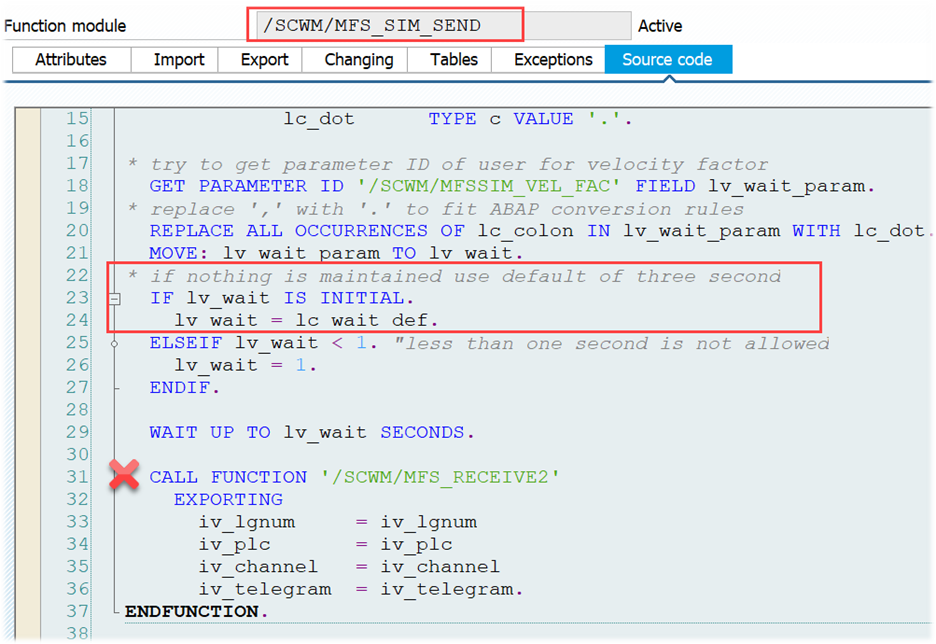
Those of you who are following my blog already know that this FM is the one which is responsible to process all incoming telegrams in EWM MFS (check this blog post in case you want to learn more about how EWM processes incoming telegrams).
So you see that the emulation is calling the exact same coding for incoming telegram processing that would be called in case a real subsystem would have sent this telegram to EWM!
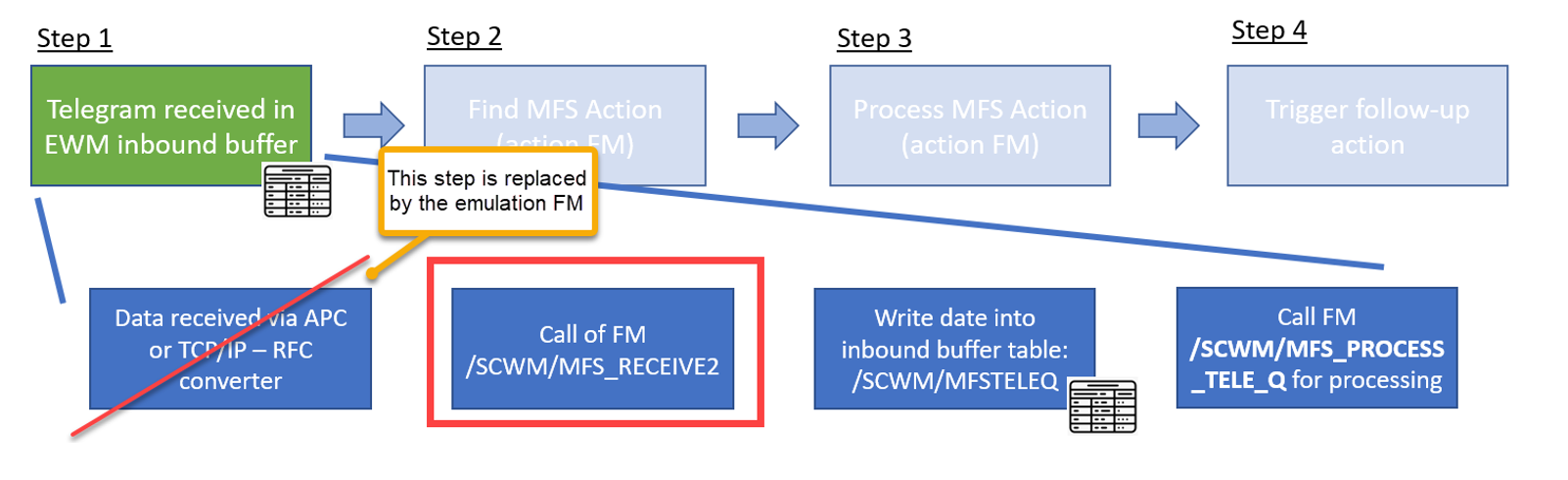
…and that’s it from technical perspective in terms of EWM Standard Emulation!
Summary
- What SAP calls ‘Simulation’ is rather an ‘Emulation’ based in my interpretation of the definition of both terms
- The emulation is useful to test telegram creation, MFS routing and processing of incoming telegrams from EWM perspective. It is not useful to test connection, protocol & communication with a real subsystem
- There is not much to do in case you want to use it – only adjust the PLC application data
- Technically the FM
/SCWM/MFS_SIM_RECEIVEis doing nothing else than taking the outgoing telegram and converting it into an incoming telegram while changing the telegram category & type - The incoming telegram created by the emulation FM is processed via FM
/SCWM/MFS_RECEIVE2in the same way as telegrams coming from a real subsystem
Final words -
Last but not least I would like to mention that you will most probably not be able to emulate your MFS project entirely with the standard emulation. Projects tend to be more complex and all subsystem vendors have their own telegram types along with specific requirements for an emulation. Having said that, the standard FM provides a good starting point and option to use it as a copy-template for your Z-Emulation!
📧 Newsletter
Get updates about new blog posts directly in your inbox.
▶️ YouTube Channel
Subscribe to my channel for regular tutorials & insights about SAP EWM.